


Support -> How To Delete a Group
How To Delete a Group
This guide will show you how to delete a group that has been created to help organize your customers within your online appointment scheduling tool.
Step 1. Enter the "View Groups" Section
After selecting the "Client" tab in the appointment scheduling tool, select the "View Groups" option.

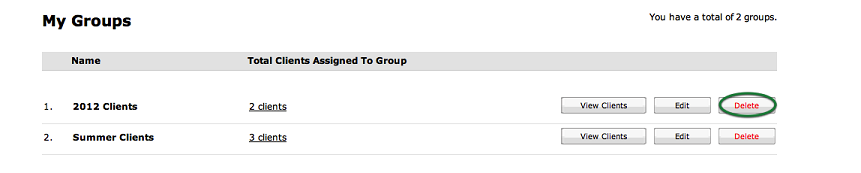
Step 2. Delete the Group
In the list of Groups, find the Group you want to delete. Select the "Delete" button next to
the appropriate Group. A confirmation window will appear: if you are sure you want to delete
the group, select "Yes", otherwise select "No".
NOTE:
Deleting a group will have no affect on the client profiles. Client profiles will not be deleted.
Deleting a group will have no affect on the client profiles. Client profiles will not be deleted.
© 2009 - 2019 calendarspots.com