


Support -> How To Invite a Client to Use Your Scheduling System
How To Invite a Client to Use Your Scheduling System
This guide will show you how to invite a client to use the booking portal that is already added to your customer database.
Step 1. Enter the "Client Lookup" Section
After selecting the "Client" tab in the scheduling system, select the "Client Lookup" option.

Step 2. Select the Client You Want to Invite to Use the Online Booking System
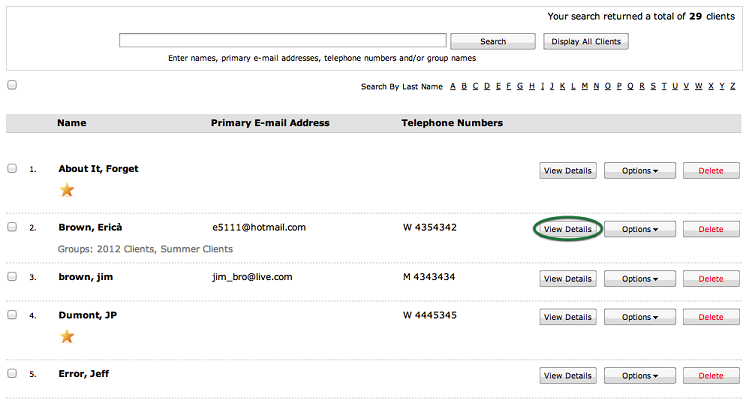
Select the client you want to invite by entering the client's name, primary e-mail address,
or telephone number in the search field, or by finding the client in the list. Once you have
found the client, click "View Details" button for the appropriate client name.
Step 3. Invite the Client
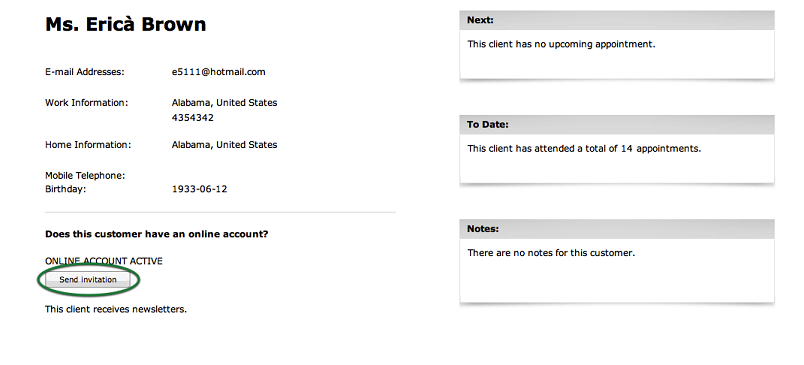
In the Client Details section, click on the "Send Invitation" link to send an automated
email to the client with information about using the system. If the client has not yet
initialized their password, a link to initialize their password will be included
in the e-mail. This will allow them to easily set their password to access the online booking software.
© 2009 - 2019 calendarspots.com