


Support -> How To Add a Room
How To Add a Room
This guide will show you how to add a room to your room booking software.
Step 1. Enter the "Add Room" Section
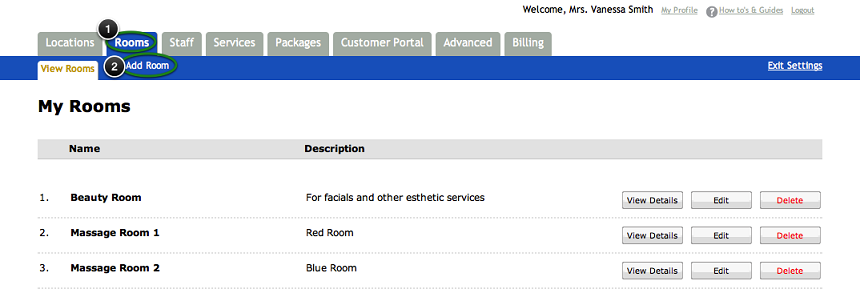
After selecting the "Rooms" tab in the Settings page, select the "Add Room" option. This will display the "Add Room" form.
The room scheduling functionality of our scheduling software is great when your employers are sharing multiple rooms. This feature will avoid rooms being double booked and allow staff to easily manage room availability using the shared online calendars.
The room scheduling functionality of our scheduling software is great when your employers are sharing multiple rooms. This feature will avoid rooms being double booked and allow staff to easily manage room availability using the shared online calendars.
Step 2. Enter the Room Details within your Room Booking Software
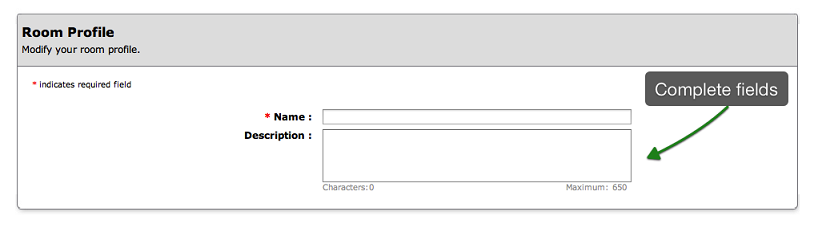
Enter the name of the room in the "Name" field and add a description of the room in the
"Description" field. The description is optional and allows you to keep track of what the
room is being used for.
Step 3. Save Your Changes
Don't forget to click the "Save" button at the bottom of the page to confirm your changes.
NOTE:
There are no schedules associated to rooms similar to the staff schedule functionality. Rooms are considered available during the business hours.
There are no schedules associated to rooms similar to the staff schedule functionality. Rooms are considered available during the business hours.
© 2009 - 2019 calendarspots.com